Skip to content
Solaris Lab
Menu
Mission control room: operators at their monitors; on the big screen, the SOLARIS rocket on its pad and live telemetry

Solaris · App Studio

When the spreadsheetmaxes out,we build your app.

Fig. 01 — Mission control: every order in sight.34°36’S 58°22’W · Buenos Aires

We design and build custom apps for your company’s operation: orders, warehouse, delivery, collections and payments, connected to your sales channels and your system.

Connects with
Tiendanube, Shopify, MercadoLibre, your ERP and your CRM
Lives in
Your company’s Google account: code and data in your name

We connect via API

  • Tiendanube
  • Shopify
  • MercadoLibre
  • Google Sheets
  • BigQuery
  • Apps Script
  • WhatsApp
  • n8n
  • Your ERP and your CRM

Why custom

If your team copies orders across three screens, the problem isn’t the team. What’s missing is a tool built for the way your company works.

The app · designed in Figma

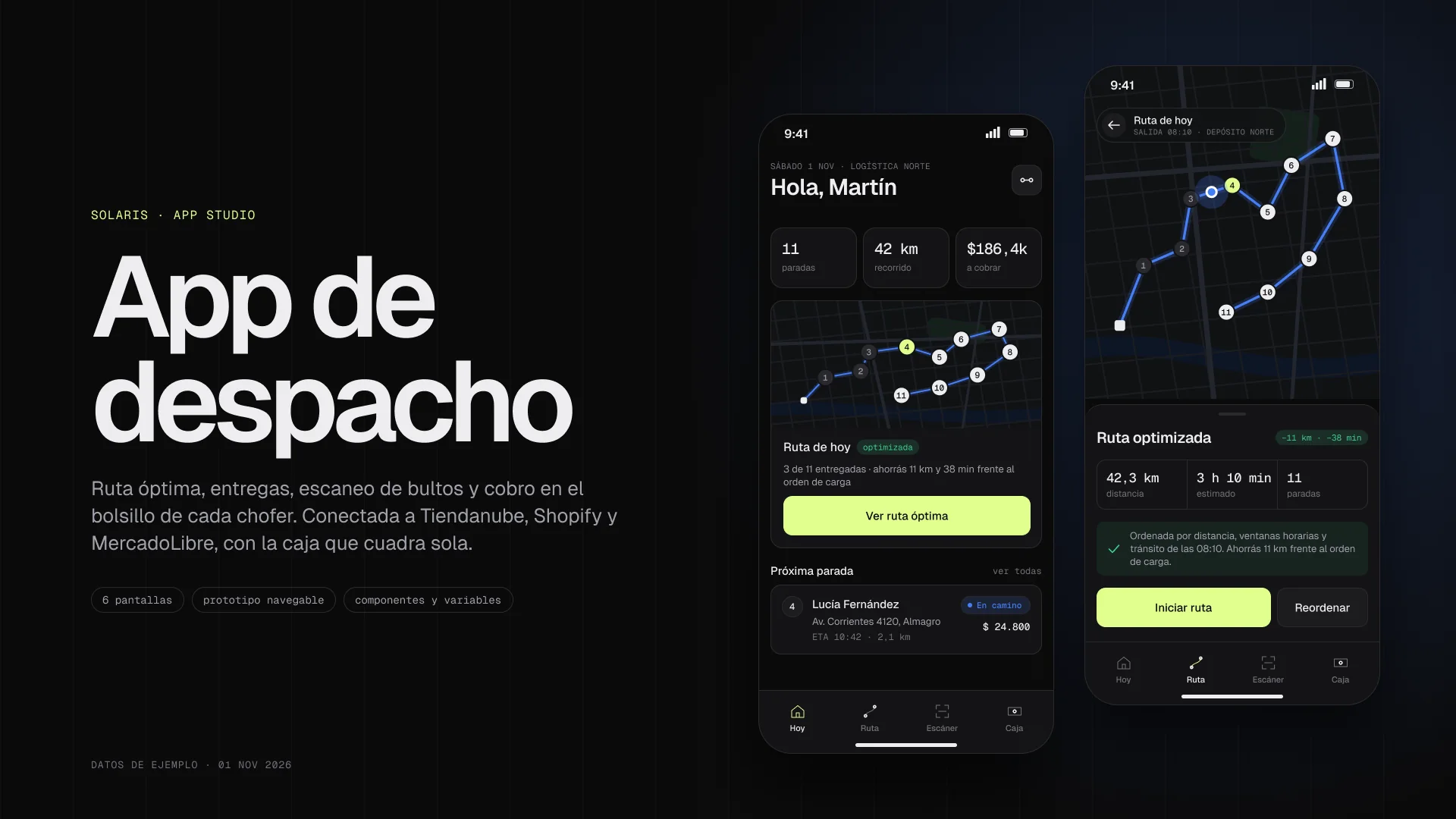
The optimal route, in every driver’s pocket.

This is what a dispatch app looks like before it’s coded: six screens built with components and a clickable prototype in Figma. It’s what we deliver in phase 2, with your sample data.

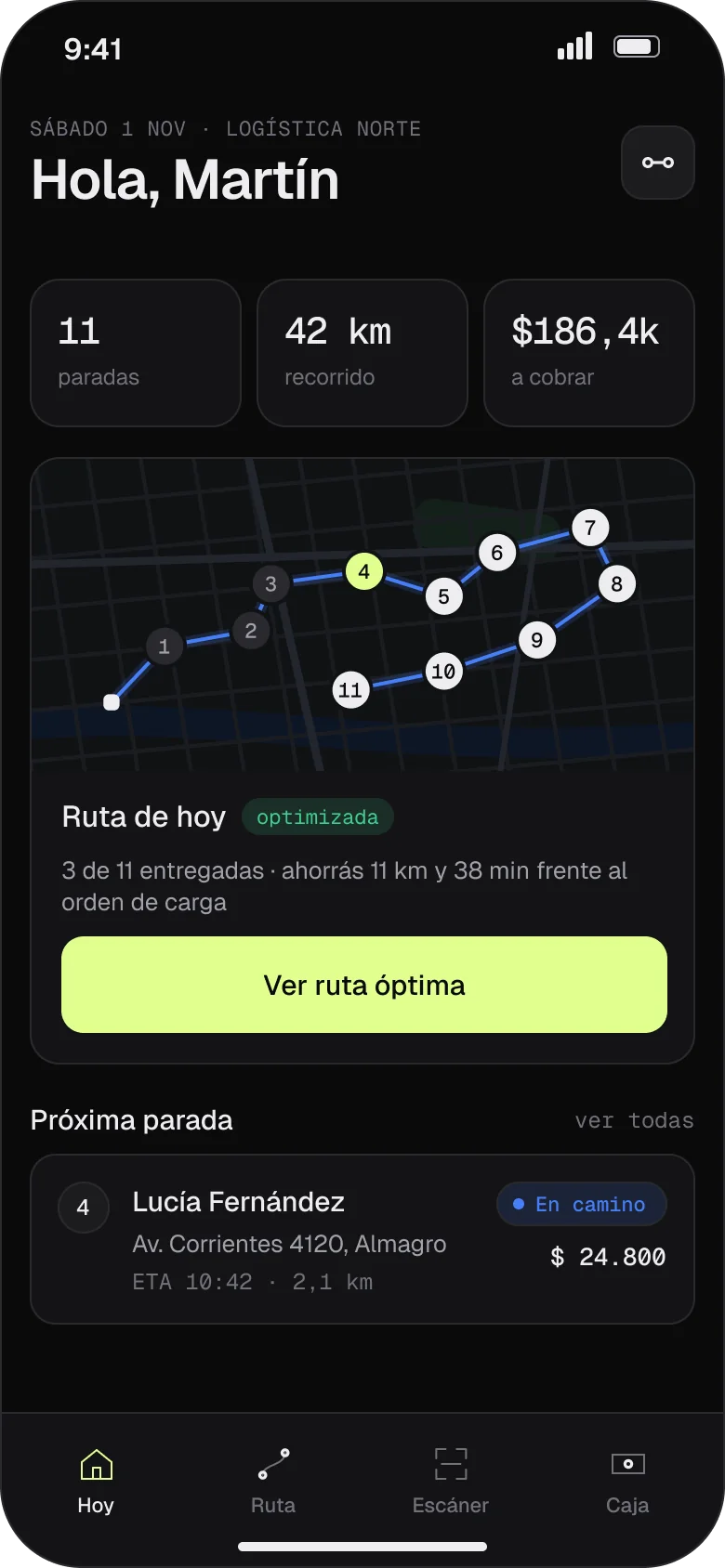
The driver’s day: 11 stops, 42 km and 186,400 pesos to collect, with the route already sorted
01 · TodayThe day at a glance: stops, kilometers and what to collect.
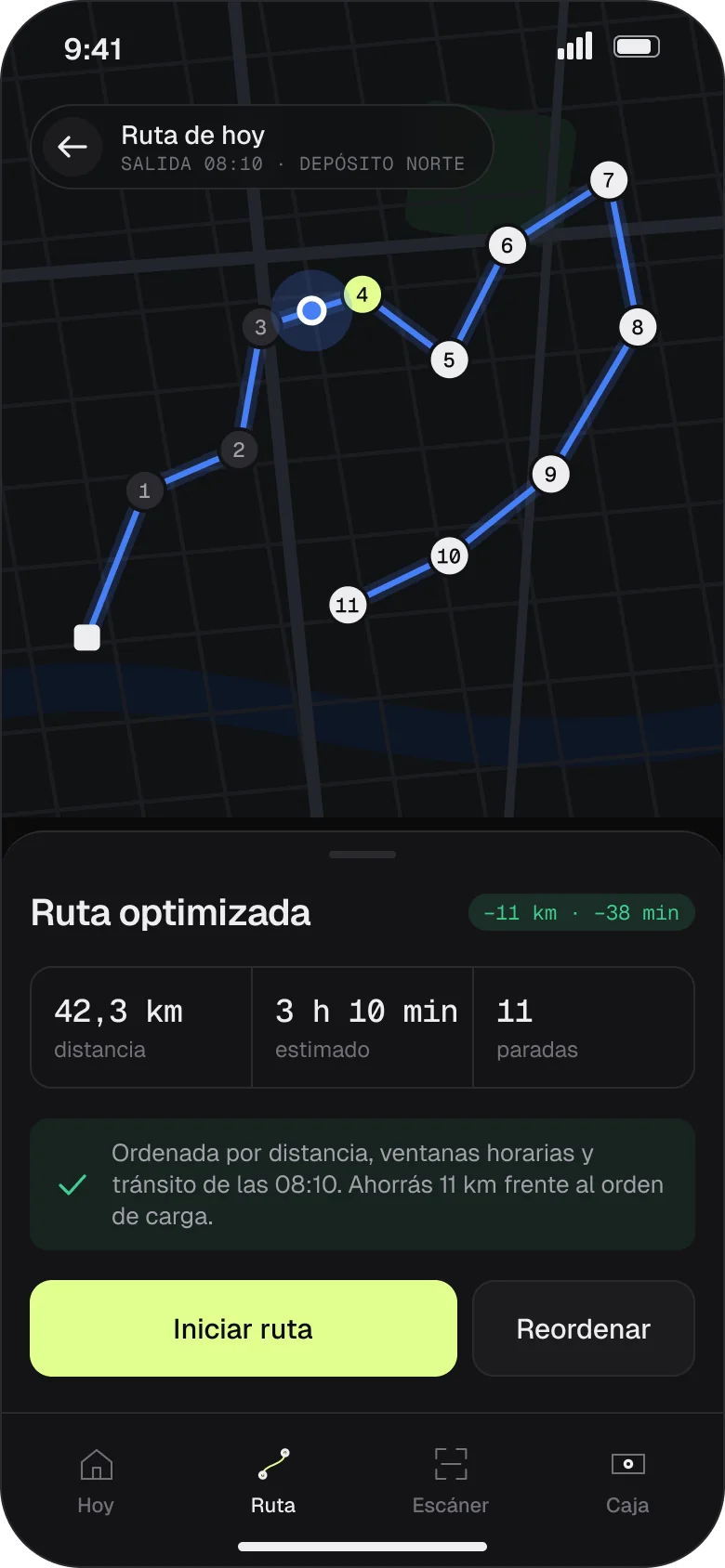
Map of the optimized 11-stop route: 42.3 km, 3 h 10 min, 11 km less than the loading order
02 · Optimal route · featuredSorts by distance, time windows and traffic, and shows how much it saves.
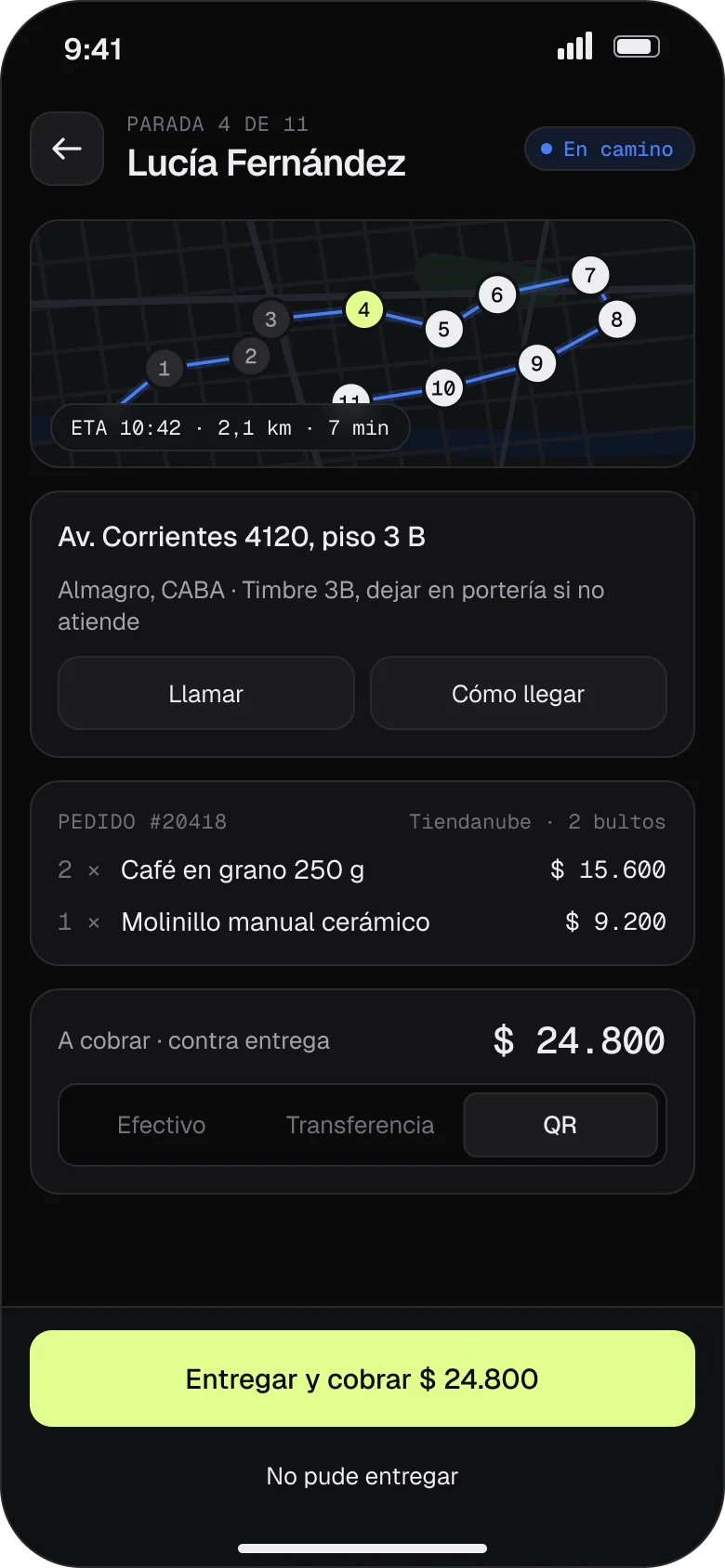
Stop 4 detail: address, Tiendanube order, QR payment and the Deliver and collect button
03 · StopAddress, order, parcels and payment with whatever method the customer picks.
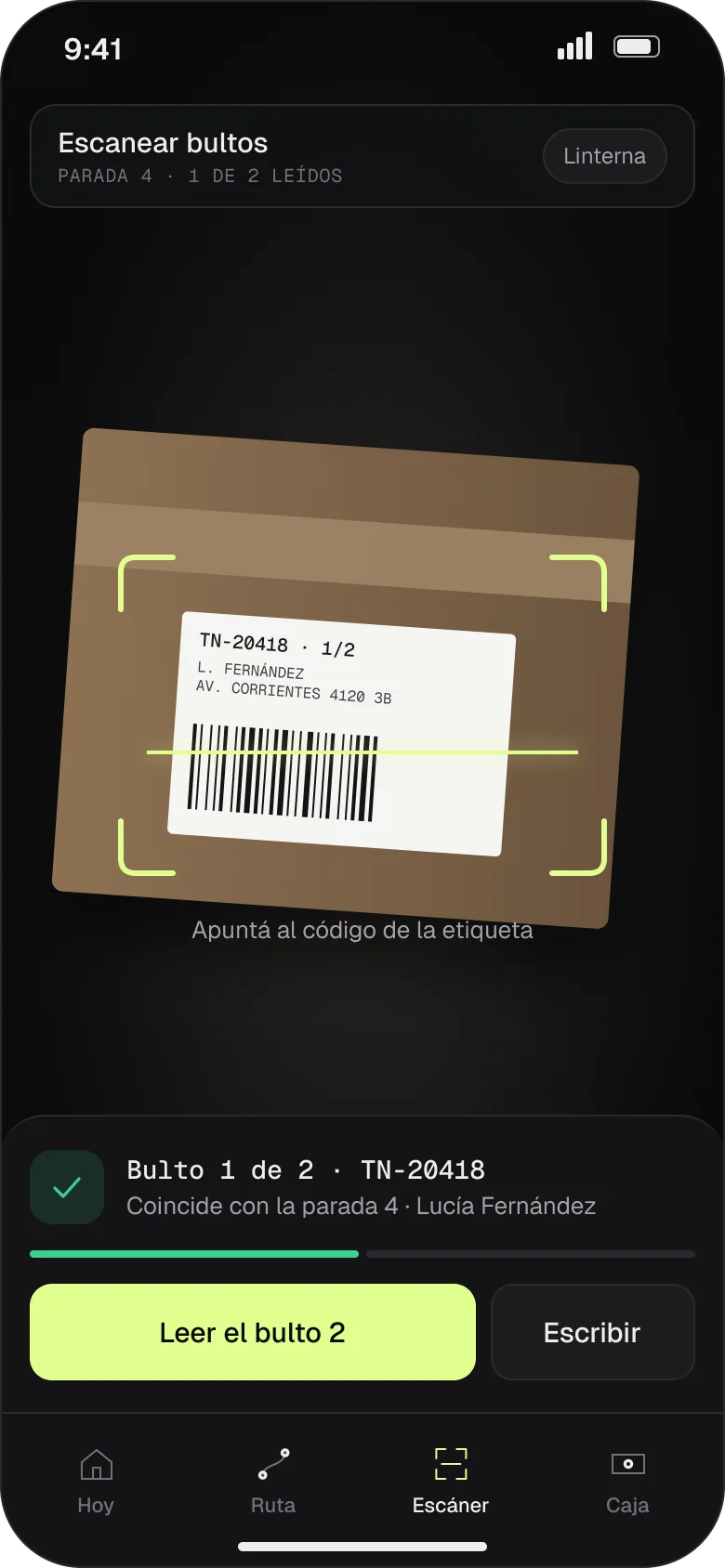
Scanner reading a parcel label that matches the stop
04 · ScannerEvery parcel is scanned before delivery; if it doesn’t match, the app warns you.
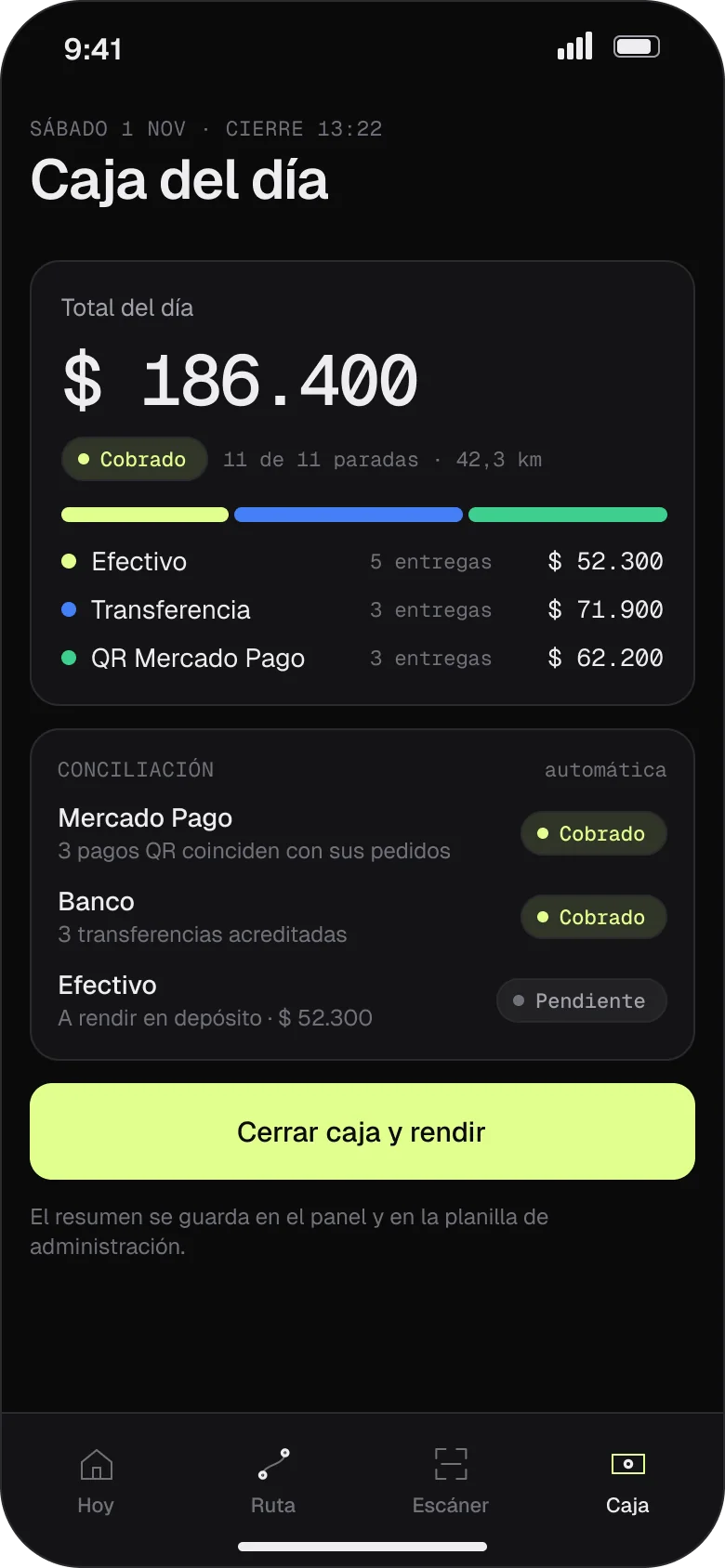
Daily cash: 186,400 pesos collected, split into cash, bank transfer and QR, with reconciliation
05 · Daily cashCollections by payment method and automatic reconciliation with payments and the bank.
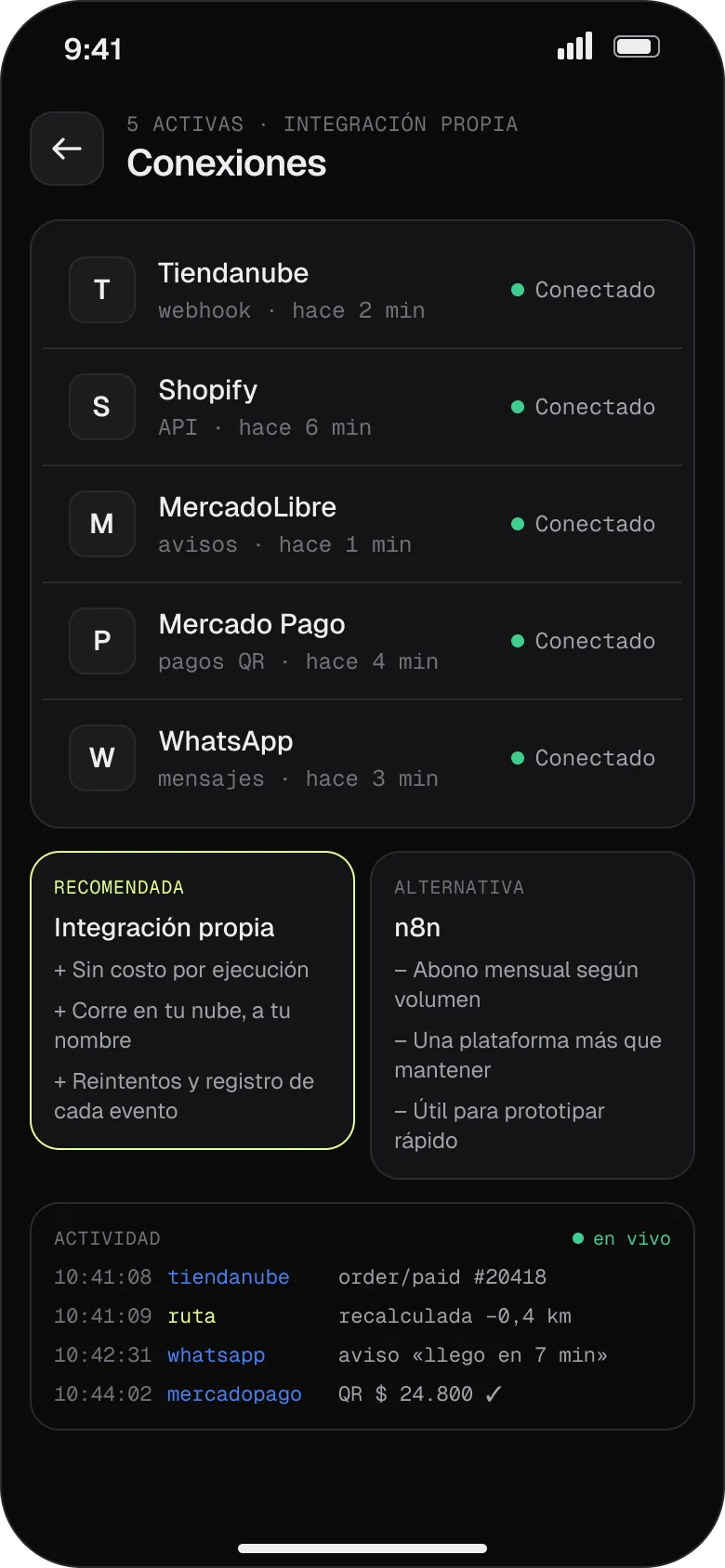
Active connections with Tiendanube, Shopify, MercadoLibre, Mercado Pago and WhatsApp, plus the live log
06 · ConnectionsWhat’s connected and what happened when, with retries and a log.

Fig. 02 — Mobile prototype in Figma, with sample data.Swipe to see all six screens

How it connects

Your sales channels come in. Your operation comes out organized.

The app reads orders via API the moment they arrive, assigns them on its own and sends every status change back to the store, which notifies the customer.

  1. 01 · In

    Sales channels

    • Tiendanube
    • Shopify
    • MercadoLibre
  2. 02 · Sorted

    Your app

    • Orders from every channel on one dashboard
    • Courier assigned by zone
    • Optimal route by distance, schedule and traffic
  3. 03 · Out

    Warehouse and street

    • Scanner on the phone
    • Thermal labels with QR
    • Payment and status at delivery
  4. 04 · Closed

    Money and data

    • Cash count by courier
    • Payouts by zone and rate
    • Sheets and BigQuery

Fig. 03 — An order’s journey, from the store to the payout.Packed, on the way and delivered sync back to the store automatically

n8n or our own integration?

Option A

With n8n

An automation platform with visual flows. Quick to set up and easy to see what happens at each step.

Best if
You want to test quickly or your team already uses n8n.
Keep in mind
It’s a monthly subscription or one more server to maintain, and one more part that can fail.
Option BOur usual choice

Our own integration

The connection to each API is written into your app, with its own tests. No middlemen and no monthly platform fee.

Best if
Your operation is already clear and you want speed, control and a low fixed cost.
Keep in mind
It takes a few more days of development at the start.

In the case below we started with n8n and later moved MercadoLibre to a direct connection: one less part to pay for and maintain.

The case · Dispatch and delivery

A consumer-goods e-commerce with its own delivery across Buenos Aires.

For confidentiality we don’t name the client or show their system. In production, the app carries their brand.

The problem

Tiendanube and MercadoLibre orders lived in separate spreadsheets. The warehouse didn’t know what to pack first, the cash drivers brought back was counted by hand, and each courier’s payout was worked out at the end of the week, with arguments.

What we built

  • A dashboard with both channels, the daily cutoff and delays in plain sight
  • Automatic assignment of each order to a courier by zone
  • Picking with a phone scanner and thermal labels with QR
  • Statuses that sync back to Tiendanube and notify the customer
  • Daily cash count and payouts by zone, with a receipt to sign

2→1

Sales channels on one dashboard

3

Statuses that sync back to Tiendanube on their own and notify the customer

170+

Automated tests before every deployment

1

Daily cash close per courier

The mission

Nothing gets coded without your green light.

First we understand how your team works, then we design it and you try it in Figma. Only with your approval does the coding start.

Phase 1

Mission plan

We map your operation, its flows and what needs connecting. Discovery.

1 to 2 weeks
Phase 2

Design in Figma

Screens and a clickable prototype with your sample data.

Prototype
Phase 3

Green light

You approve it in Figma before a single line of code is written.

Go
Phase 4

Development with tests

Delivered in parts; each part is tested on its own before release.

In stages
Phase 5

Launch

It goes into your company’s Google account, in the nearest region. Code and data in your name.

Launch
Phase 6

In orbit

Monthly support: tweaks, new features and monitoring of the connections.

Monthly

Fig. 04 — How you approve it

Cover of the dispatch app’s Figma file, with the Today and Optimal route screens
Figma file · Cover
The Optimal route screen, as seen in the prototype
Mobile · Optimal route

“Can the cutoff be at 1:30 pm?” — client comment in Figma

Screens are designed and commented on in Figma, with your team. What gets approved there is what gets built.

Pricing · proposal

Start with the mission plan.

Once Discovery is done, the app is quoted in writing, with fixed scope, timeline and price. If you go ahead, Discovery is credited.

To startCredited later

Mission plan

USD 400From · 1 to 2 weeks

Discovery: we understand your operation and hand you the plan.

  • Sessions with your team
  • Key flows and screens
  • What connects and how: n8n or our own integration
  • The app’s scope, timeline and price in writing
Custom quote

Your app

Quoted4 to 10 weeks · paid in stages

Design in Figma, development with tests and launch in your account.

  • Clickable prototype before coding
  • API integrations with your channels and your system
  • Partial deliveries you can test
  • User guide and team training
Monthly

In orbit

CustomPer month · cancel anytime

So the app keeps pace with your business.

  • Tweaks and new features
  • Monitoring of every API connection
  • An alert if something fails, before your team notices
  • A monthly review with numbers

Reference prices in US dollars. They’re a proposal and are confirmed in writing before we start.

Frequently asked questions

Do I need to pay for n8n?

No. We can connect everything with our own integrations, written into your app, with no platform to pay for every month. If you already use n8n or want to test quickly, we use it too. We decide it in the mission plan.

Who owns the code?

You do. The app, the code and the data live in your company’s Google account from day one, documented, so you don’t depend on us to use it.

Where is it hosted?

In your company’s Google account (Google Workspace or Google Cloud), in the nearest region. Pages that need the camera, like the scanner, are published separately on static hosting.

Does it connect to my ERP or CRM?

If it has an API, yes. We work with Tiendanube, Shopify, MercadoLibre and business management and CRM systems. In the mission plan we review what your system exposes and how to connect it.

What if I need changes later?

With the In orbit support plan we add features and tweaks every month. Every change goes through the automated tests before it reaches your team.

Contact

What do you want to stop doing by hand?

Tell us how your team works today. We’ll reply with a proposal for the mission plan.

WhatsApp
+54 9 11 5875-6440
Email
info@solaris-lab.com

Or leave your details

Tell us what app you need and we’ll reply the same day with a proposal for the mission plan.

We only use your details to reply to you. Privacy policy.

WhatsApp